PXM Pro includes managed services and database adoption. Use a new managed instance, keep a server you already run, or import a copy of its databases into a service PXM manages.
Twelve engines.
- MySQL
- 8.4, 8.0
- MariaDB
- 11.8, 11.4, 10.11
- PostgreSQL
- 18, 17, 16, 15, 14 · PostGIS, pgRouting, pgvector
- MongoDB
- 8.0, 7.0
- Redis
- 8.2, 6.2
- Valkey
- Default
- Memcached
- Default
- Meilisearch
- Default
- Typesense
- 30.2, 29.0
- Mailpit
- Default
- MinIO
- Default
- RustFS
- Apple silicon only
PXM downloads verified service packages directly. New managed services do not require Homebrew.
Add a new service.
Choose Add Service, then pick the engine and version. PXM downloads what it needs and shows progress before the service is ready to start. Turn on Start when PXM opens for services you use daily. Run several instances of the same engine side by side, each with its own port and storage.
New services prefer standard ports: 3306 for MySQL and MariaDB, 5432 for PostgreSQL, and 8025 for the Mailpit web inbox with 1025 for its SMTP. When a port is busy, pick another or stop the existing owner deliberately.
pxm service add redis --name cache --port 16379
pxm service env cache
pxm service clone cache --name cache-copy
Connect your project.
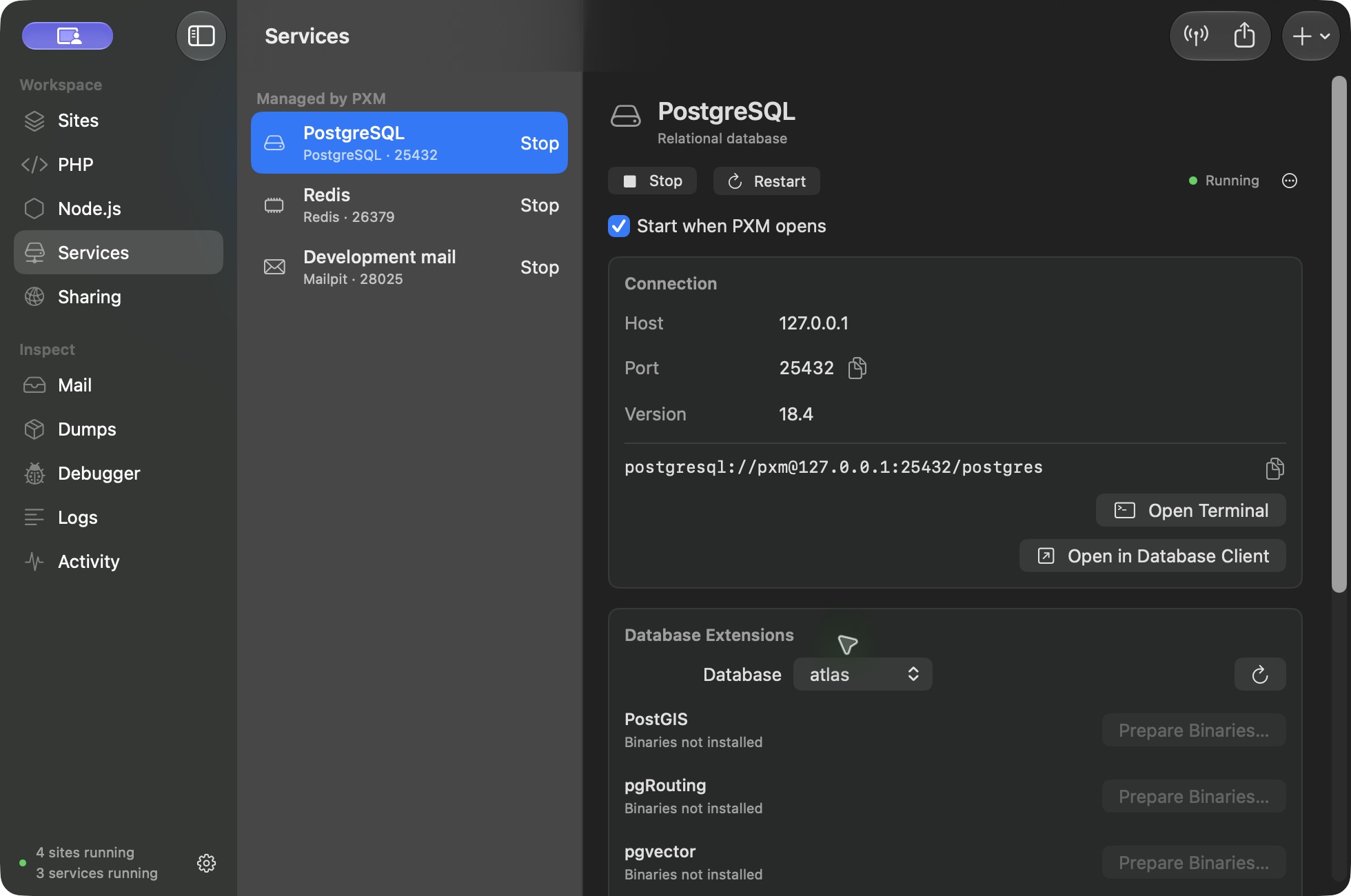
Each service shows its host, port, version, and connection string. Copy the .env lines, open a terminal client, or open the database in your database client. Provisioning creates the instance only. It does not run migrations, import data, or create buckets or indexes.
Clone and autostart.
Clone a stopped instance into separate storage to try a risky change. Set Start when PXM opens per service, and read each service's logs in place.
PostgreSQL extensions.
Select a database in a PostgreSQL service and prepare PostGIS, pgRouting, or pgvector from the Database Extensions panel. Prepare the binaries, then enable the extension for the selected database. PostgreSQL 14 and 15 are not yet verified for these extensions.
Keep the current server.
Choose Connect Existing Database. PXM discovers local installations, including Herd, Homebrew, Postgres.app, MAMP, and Docker's locally published ports. You can also enter a port or Unix socket.
Test the credentials and choose Keep Current Server. PXM saves a connection; it does not start, stop, upgrade, or remove the original server. Passwords can be saved in the macOS Keychain.
Bring a copy into PXM.
- 1Test the source connection and choose Manage in PXM.
- 2Select the application databases to import and review compatibility.
- 3Pause applications and jobs that write to those databases.
- 4Start adoption.
PXM uses logical backup tools to restore into a new, independent service.
- 5Review the verification results and test your application against the copy.
- 6Use Connect Sites to review the project configuration change.
Supported paths cover MySQL 8.0 and 8.4, MariaDB 10.11, 11.4, and 11.8, and PostgreSQL 14 to 18, where matching runtime and client tools are available. The source databases stay with the source server. Recovery data is kept if an import fails. PXM never points another database binary at an existing installation's data directory.
Move to a newer major version.
Logical version migration is available for managed MySQL, MariaDB, and PostgreSQL instances. Back up first, verify your application against the new instance, then switch your project.
What does not move automatically.
Server-wide settings, passwords, replication, and third-party extensions are not copied. MySQL scheduled events stay disabled in the copy. Database roles are kept without login credentials; configure application accounts as needed. Unsupported objects or extensions can prevent a copy. When automatic import does not fit, keep using the existing connection.
WordPress and Mail.
Creating a WordPress site provisions an isolated MySQL 8.4 instance for it. Mail, the local inbox, runs on a managed Mailpit service and offers an HTML preview with Text, Headers, and Raw views. Messages are caught, not delivered.
Before retiring the original.
Verify application behavior and your own backup. Table and row-count checks help, but they do not replace application-specific validation. Stop the original server through its owner only after every application has switched.
If Pro expires.
Managed services stop gracefully. Database files and project settings stay on disk, and the recovery commands keep working without a license: pxm services, and pxm service stop, logs, env, and remove.