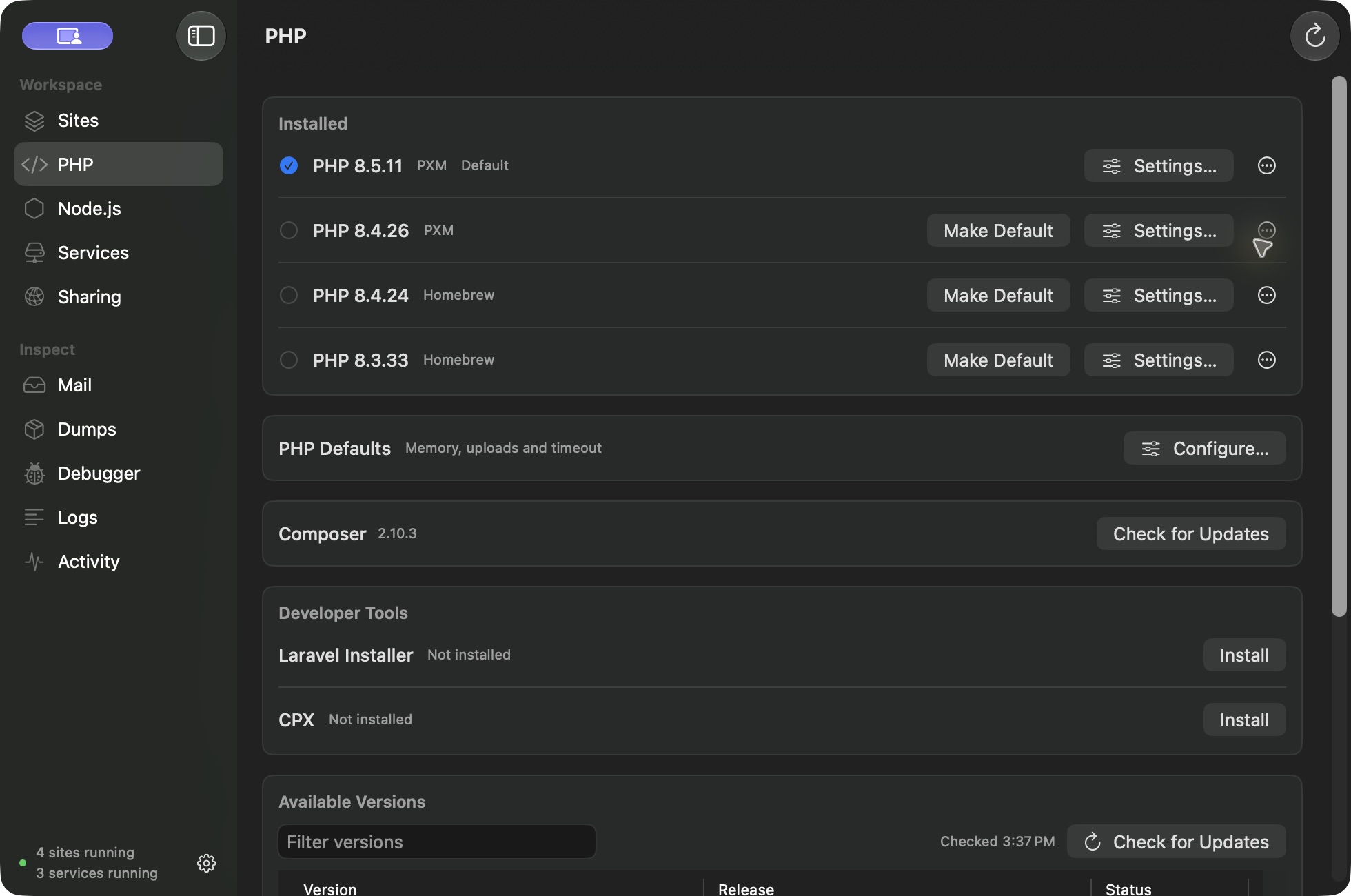
Download PHP in the app.
Open PHP and pick a version. PXM downloads its signed prebuilt PHP CLI, PHP-FPM, and matching extension kit. Current stable releases are 8.2.35, 8.3.36, 8.4.27, and 8.5.12, for Apple silicon (M1 or later). PHP 8.6.0RC4 is available separately as a clearly marked preview. No Homebrew, Xcode, or compiler is needed. PHP 7.4, 8.0, and 8.1 are not supplied.
The catalog shows only packages published for your Mac. Check for Updates refreshes the catalog without installing or switching anything. Choose Update on each version, or Update All for stable releases. You can queue another download while one is running, with progress shown on each row.
pxm runtime install php 8.4
pxm runtime default php 8.4.27
pxm site php shop 8.4
Defaults and project pins.
Make a version your workspace default, then pin individual sites. A minor pin such as 8.4 follows the newest installed matching patch. An exact pin such as 8.4.27 stays put. Updating the workspace default moves it to the new patch in the same stable branch; exact project pins and older installed versions stay available. A pin to a version that is not installed produces an error rather than a silent fallback.
PHP-FPM pools.
Each site runs in its own PHP-FPM pool behind Caddy. Choose between 2 and 32 workers per site. Because pools are separate, sites on different PHP versions serve at the same time.
Extensions.
Stable managed packages include mysqli, OPcache, PDO for MySQL, PostgreSQL, and SQLite, Redis, and APCu, with matching intl, sodium, Xdebug, and SPX builds. PXM enables intl and sodium for normal managed installs while respecting explicit choices you have made. SPX is included in Free. Xdebug is a Pro feature. Both are turned on per site, and a site uses one of them at a time.
Use PHP settings to manage compatible imported extensions. Third-party modules are not guaranteed to support every PHP version or architecture.
PHP 8.6 preview.
The preview includes PHP core, PDO for MySQL, PostgreSQL, and SQLite, intl, sodium, and Xdebug. APCu, igbinary, Imagick, IMAP, msgpack, Redis, SQLSRV, PDO_SQLSRV, and SPX are not available in this preview. PXM shows these limits before the first install. Use stable PHP for projects that need those extensions.
Select a preview explicitly for a project or as your workspace default when you are ready to try it. Stable Update All does not install previews.
Memory, uploads, and timeouts.
Set workspace PHP defaults for memory, upload size, POST size, and request timeout. A runtime can inherit them or use its own values. Saving validates the configuration and restarts affected PHP sites.
Debugging and profiling.
With Xdebug on a site (Pro), trigger-based debugging works per request, and pxm debug and pxm coverage run the CLI under Xdebug. Profiles open as a Cachegrind table, a call graph, or a flame graph. Automatic request debugging looks for breakpoints saved in .idea/workspace.xml; it does not read a live PhpStorm session. With SPX on a site (Free), open the local authenticated dashboard from the app.
Node.
Install official Node releases side by side; every download is checksum-verified. Set a default or pin per site. PXM reads .nvmrc and .node-version files and understands LTS aliases. Existing nvm, fnm, or asdf installs are not migrated.
pxm runtime install node 24.5.0
pxm site node shop 24
Composer and developer tools.
Composer is installed with signature verification and updated from the app. It runs in the selected PHP context. The Laravel installer and CPX appear as developer tools on the PHP screen.
Your terminal.
Choose Set Up Terminal to put pxm and its shims on your path. php, node, npm, npx, composer, corepack, laravel, and cpx then follow the project you are in, and pxm which php shows which binary wins and why. Other shell managers may provide their own php or node; review your PATH order rather than removing them. Full reference: the command line.